
Rockin Robin SongFlying The Web For News.
RobinPost Logo Amazon Prime Deals


Consumer Daily Reports

Hidden Gmail tools can eliminate email clutter in just a few clicks

By Kyle James of ConsumerAffairs
August 3, 2026
  • Cut inbox clutter fast. Add #sub to your Gmail URL to access Gmail's hidden Subscriptions page and unsubscribe from unwanted emails in just a few clicks.

  • Let Gmail do the work. Search shortcuts, labels, filters, and the built-in Unsubscribe button can organize years of email in minutes.

  • Treat your inbox like a to-do list. Archive emails you'll need later, delete what you won't, and use labels and snooze to keep important emails front and center.


From hidden Gmail tricks to powerful search tools, here's how to eliminate inbox clutter, manage subscriptions, and finally make Gmail work for you.

If checking Gmail feels like digging through a junk drawer, you're not alone. Between store promotions, newsletters, package updates, social media alerts, and marketing emails, the average inbox can become overwhelming surprisingly quickly.

The good news is that you don't need to create a new email address or spend hours deleting emails one-by-one.

Here are six powerful (but often overlooked) Gmail features that can dramatically clean-up your inbox.

1. Add #sub to your Gmail URL

Consumer News: Drowning in Gmail? 6 smart ways to clean up your inbox and take back control

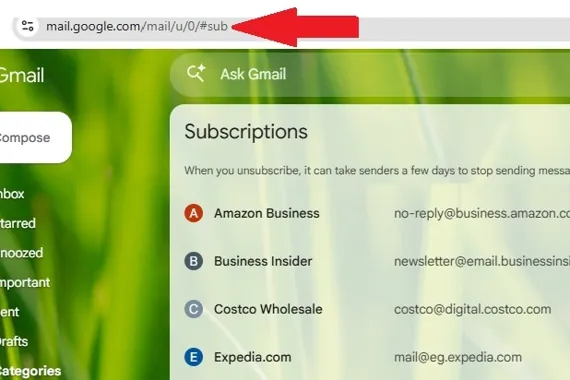
Here's one of Gmail's best-kept secrets. While logged into Gmail, simply add #sub to the end of your Gmail URL and press Enter.

For example:

From:

https://mail.google.com/mail/u/0/#inbox

To:

https://mail.google.com/mail/u/0/#sub

This will take you to Gmails somewhat hidden Subscriptions page, where all of your recurring email subscriptions are gathered into one convenient list.

This eliminates the need to search for newsletters or company subscription emails one by one. The you can quickly see who's filling your inbox (and how often) and unsubscribe with just one click.

Pro tip: Start with the companies that send you the most emails. Unsubscribing from just five or six of those frequent senders can dramatically reduce your daily inbox clutter.

2. Use Gmail's built-in Unsubscribe button

You don't have to scroll to the tiny unsubscribe link at the bottom of every marketing email.

For many legitimate newsletters, Gmail displays an Unsubscribe button next to the sender's name at the top of the message. One click removes you from future marketing emails without ever leaving Gmail.

Important: If an email looks suspicious or appears to be phishing, don't click unsubscribe. Mark it as spam instead.

3. Find out whos flooding your inbox

Before deleting anything, identify the senders creating the most clutter.

Search Gmail for a retailer, newsletter, social network, or delivery service you frequently see. Try the company name first, then search the senders email address if the results are too broad.

You can also use searches such as:

  • category:promotions

  • category:social

  • from:retailer@example.com

  • list:newsletter@example.com

  • unsubscribe

Gmails Promotions category, for example, is specifically designed for deals, offers, and marketing emails, while Updates typically holds automated confirmations, statements, and reminders. Try reviewing one category at a time and it will make the cleanup feel far less overwhelming.

Once you find a repeat offender, dont simply delete its latest email. Search for every message from that sender, unsubscribe, and then remove the backlog.

On desktop, select the checkbox above the search results. Gmail may initially select only the messages visible on that page, so look for an option to select all conversations matching the search before deleting or archiving them.

Pro tip: Start with the retailers and newsletters sending several emails per week. Removing five aggressive senders may reduce more clutter than unsubscribing from 25 occasional newsletters.

Be careful not to bulk-delete messages from banks, insurers, utilities, schools, medical providers, or tax services until youve checked whether they contain records you may need.

4. Master Gmails search shortcuts

Gmails search bar can do much more than find a senders name. It lets you quickly narrow messages by date, size, status, category, recipient, and attachment type. And you can actually combine multiple search filters in one search.

Useful cleanup searches include:

  • older_than:2y give you messages older than two years

  • category:promotions older_than:6m older marketing emails

  • is:unread older_than:1y long-ignored unread messages

  • larger:10M messages larger than 10 megabytes

  • has:attachment larger:5M large messages with attachments

  • filename:pdf older_than:3y older PDF attachments

  • from:example.com older_than:1y older messages from one company

  • before:2025/01/01 anything received before a specific date

  • has:drive messages containing Google Drive links

Once you narrow down your search, you can then start organizing the emails that you want to keep.

5. Know when to archive, delete, snooze, or mute

These four Gmail actions solve different problems, but many people use only Delete.

  • Archive removes a message from the inbox while keeping it in your account. It remains searchable, and if someone replies to the conversation, it returns to the inbox.

    Archive the following:

    • Receipts you may need later

    • Travel confirmations from completed trips

    • Work conversations that are finished

    • Warranty information

    • Financial notices worth retaining

  • Delete messages that have no future value, such as expired promotions, duplicate shipping alerts, and outdated newsletters.

  • Snooze messages that matter but dont require your attention today. Gmail will temporarily remove them and return them to the inbox at the date and time that you choose.

  • Mute long group threads you no longer need to follow. Future replies generally skip the inbox and go directly to the archive, although Gmail will bring them back if someone directly addresses you.

Pro tip: Treat your inbox as a to-do list, not as permanent storage. When a message no longer needs your attention, consider archiving it or deleting it.

6. Use a small, practical label system

Labels can help, but creating dozens of them may simply replace inbox clutter with label clutter.

Unlike traditional folders, Gmail labels can overlap. One message can carry several labels for example, Travel, Receipts, and Taxes without requiring multiple copies. Google allows users to create labels, nest them, apply more than one to a message, and combine them with filters.

Start with a short list of labels based on the emails you retrieve regularly.

In my experience, here are the labels worth creating:

  • Action required

  • Bills

  • Receipts

  • Travel

  • Taxes

  • Medical

  • School

  • Work

  • Warranties

Definitely try to avoid labels for every retailer, acquaintance, or temporary project, as you end up with too many. Using Gmail search to find those emails is usually a better solution.

Pro tip: Consider setting a personal inbox limit to keep things under control. This could be something like 25 or 50 emails. Then when the total rises above your number, spend a few minutes archiving and deleting until youre back under control.

Consumer News: Drowning in Gmail? 6 smart ways to clean up your inbox and take back control

Photo By CNET


Posted: 2026-08-03 21:53:28
Get Full News Story On Consumer Affairs


More News From This Category
Consumer News: Some Grocery Outlet stores are using facial recognition. Here's what shoppers should know
Mon, 03 Aug 2026 19:07:06 +0000

The anti-theft technology is expanding but so are privacy concerns

By Kyle James of ConsumerAffairs
August 3, 2026
  • The technology compares shoppers' faces against watchlists of people suspected of theft, fraud, or violence.

  • Privacy advocates warn that everyone entering the store is scanned, and facial recognition isn't always accurate.

  • California shoppers can request information about and in some cases deletion of their biometric data under state privacy laws.


Several Grocery Outlet stores in the San Francisco Bay Area have begun using facial recognition technology at their entrances, raising new questions about privacy and how retailers are using technology to combat shoplifting.

According to reporting by SFist and Mission Local, four stores in San Francisco neighborhoods are among those using a system called SAFR Guard, which scans the faces of people entering the store and compares them against a watchlist of individuals suspected of theft, fraud, violence, or other criminal activity.

Small signs posted near store entrances notify shoppers that "Face Matching software" is in use.

How does it work?

SAFR Guard uses security cameras to capture facial images as customers enter the store. Those images are compared against a retailer watchlist compiled from previous security incidents. If the system believes it has identified someone on the list, store employees may receive an alert.

According to the company, the technology is designed for security purposes and is intended to identify people "reasonably suspected" of unlawful activity rather than monitor every shopper.

Why are privacy advocates concerned?

Privacy advocates make the argument that the system scans everyone who walks through the door, including shoppers who have done nothing wrong.

They also point out that facial recognition technology is not perfect. Experts say factors such as lighting, camera angles, and image quality can lead to false matches. Previous studies have also found that some facial recognition systems have higher error rates for certain demographic groups.

Those concerns aren't just theoretical. In 2023, the Federal Trade Commission (FTC) prohibited Rite Aid from using facial recognition technology for five years after concluding the company's system repeatedly misidentified innocent customers as shoplifters.

What rights do California shoppers have?

California's Consumer Privacy Act (CCPA) gives residents important rights over personal information collected by businesses.

If a retailer collects biometric information such as facial images, consumers can generally:

  • Request to know what personal information has been collected.

  • Ask that eligible personal information be deleted.

  • Request that certain personal information not be sold or shared.

People who believe they have been placed on SAFR's watchlist can also request that their biometric information be deleted through the company.

One limitation, however, is that your image may already have been collected before you have the opportunity to make those requests.

What if you don't live in California?

Privacy protections vary widely from state to state.

While a growing number of states have enacted comprehensive consumer privacy laws, many do not specifically regulate facial recognition in retail settings. In many areas, retailers can legally use facial recognition as long as they provide any required notices and comply with applicable state laws.

If you're concerned about biometric privacy:

  • Look for signs near store entrances indicating facial recognition is in use.

  • Review the retailer's privacy policy before shopping.

  • Ask customer service how facial images are stored, shared, and how long they're retained.

Also, dont be afraid to ask whether you can request deletion of your data under your state's privacy laws.

Read More ...


Consumer News: Why a nervous economy may not stop holiday shopping this year
Mon, 03 Aug 2026 16:07:06 +0000

Even as Americans worry about prices, jobs, and the economy, many are still expected to spend on gifts this Christmas

By Kristen Dalli of ConsumerAffairs
August 3, 2026
  • Holiday spending is expected to stay strong despite ongoing concerns about inflation, jobs, and the economy, as many shoppers continue to prioritize gift buying.

  • Higher-income households are expected to drive much of this year's holiday sales, while many lower- and middle-income consumers are making everyday budget trade-offs to keep spending in check.

  • Retailers won't all fare the same, with beauty and apparel expected to perform well, while some mid-range department stores and home-related categories could face greater challenges.


Before the holiday shopping season kicks into high gear, many Americans are feeling conflicted about their finances.

Concerns about inflation, the job market, and the broader economy remain high, but those worries haven't translated into a major pullback in spending. In fact, retail sales have stayed surprisingly strong, raising an important question: Will anxious consumers continue opening their wallets this Christmas?

According to new research from Coresight Research, the answer may be yes. While shoppers are likely to stay price-conscious and hunt for deals, many still plan to make holiday spending a priority a trend that could shape this year's retail season.

ConsumerAffairs spoke with John Mercer, Head of Global Research at Coresight Research, who offered insight into why consumer confidence and consumer spending aren't moving in the same direction and what that could mean for shoppers this holiday season.

Budgeting trade-offs

One way to ensure holiday spending remains at high levels: day-to-day tradeoffs. Its not uncommon for many consumers to make tough budgeting decisions in the months leading up to the holidays.

We are seeing evidence of consumers on modest incomes make trade-offs in grocery, Mercer said. For example, Albertsons recently reported that it was seeing lower-income customer segments pull back most significantly, exhibiting softness in both units and overall basket sizes. Conversely, it saw higher-income customer segments demonstrate greater spending resilience.

This aligns with Coresight Research data that show close to three in five (57%) U.S. consumers are engaging in trading-down behavior in grocery (such as switching to cheaper brands, cheaper retailers or private labels/store brands).

High-income consumers are contributing the most

Coresights research also found that high-income consumers are driving the charge behind much of the expected holiday shopping thats anticipated this coming season.

Higher-income consumers remain the primary growth engine for retail, Mercer said. In our June 2026 consumer survey, 38.8% of households earning $100,000+ expected to spend more on holidays versus only 25.0% for the $50,000$99,999 bracket. The net proportion (more minus less) expecting to spend more was 18.2% for $100k+ households versus (1.9)% for $50,000$99,999 households.

Higher-income consumers remain the most bullish despite broader economic concerns. Coresight Research weekly sentiment data confirm that forward-looking personal financial sentiment remains correlated to income our weekly demographic breaks show $100k+ consumers as the most confident.

How the economy can affect retailers this holiday season

Should economic pressures continue to mount, some categories could be affected more than others when it comes to holiday shopping

Positively, beauty is experiencing strong cyclical growth, since early 2025, Mercer said. And apparel and footwear is experiencing a GLP-1 tailwind (wardrobe renewal) and is a key beneficiary of higher tax refunds, and tends to be a priority category when consumers receive windfalls like this. Big-ticket is weaker, and home-related categories are exposed to the housing market, which in turn is seeing elevated mortgage rates dampen housing transactions.

On the other end of the spectrum, mid-range department stores could be especially vulnerable.

Retailers such as Kohls are exposed to middle-income shoppers who can easily migrate to lower-price channels, Mercer said. Once consumer spending migrates to value alternatives, we believe legacy mid-range/full-price retailers struggle to regain that in full.

Over the medium term, the traditional supermarket channel is losing share in grocery to nontraditional grocery retailers such as warehouse clubs, mass merchandisers, and discount retailers we would expect any increased economic pressure to amplify this trend (as supported by Albertsons commentary, noted earlier).

Read More ...


Consumer News: Auto Safety Recall Derby - Week of August 03
Mon, 03 Aug 2026 16:07:06 +0000

Hyundai, Grand Design RV, and Autocar are part of this week's recall roundup

By News Desk of ConsumerAffairs
August 3, 2026


Weekly Auto Recall Roundup

Here are the latest vehicle and equipment recalls announced by the National Highway Traffic Safety Administration (NHTSA).

Reminder: Recall repairs are free. Contact your dealer as soon as possible if your vehicle is affected.

Autocar, LLC NHTSA Recall ID 26V501000

Issue: Antilock Braking System May Fail

Make Model Model Years
AUTOCAR E-ACTT 20232027

Hyundai Motor America NHTSA Recall ID 26V493000

Issue: Improperly Secured Ignition Coil Ground Bolt

Make Model Model Years
GENESIS G80 2027

Grand Design RV, LLC NHTSA Recall ID 26V492000

Issue: Incorrect Breaker May Allow Conductor to Overheat

Make Model Model Years
GRAND DESIGN IMAGINE 2027

Grand Design RV, LLC NHTSA Recall ID 26V491000

Issue: Incorrect Tire Pressure Information on Label/FMVSS 120

Make Model Model Years
GRAND DESIGN LINEAGE 20262027

Grand Design RV, LLC NHTSA Recall ID 26V490000

Issue: Incorrectly Secured 120V Outlet May Contact Wiring

Make Model Model Years
GRAND DESIGN IMAGINE 2026

Check your vehicle for recalls

To find out whether your specific vehicle is included in a recall, you can check by VIN or license plate on NHTSA's recall lookup page: NHTSA.gov/recalls.

If your vehicle has an unrepaired recall, contact your local dealership to schedule a repair recall remedies are provided at no cost.

Read More ...


Consumer News: Paycheck-to-paycheck living hits a five-year low, but financial stress hasn't gone away
Mon, 03 Aug 2026 16:07:06 +0000

A new survey suggests rising costs and economic uncertainty are keeping budgeting a top priority

By Kristen Dalli of ConsumerAffairs
August 3, 2026
  • Fewer Americans are living paycheck to paycheck: Just 48% say they're living paycheck to paycheck, down from 69% last year and the lowest level in five years.

  • Budgeting is more important than ever: Despite the improvement, 95% of Americans say rising costs and economic uncertainty have made sticking to a budget a necessity.

  • Experts say now is the time to prepare: Financial experts recommend creating a budget and paying down high-interest credit card debt before the economy faces its next major shift.


After years of rising prices and economic uncertainty, there's finally a bit of encouraging news for household finances: fewer Americans say they're living paycheck to paycheck than they have in the past five years. But that doesn't mean people are feeling financially secure.

A new survey from Debt.com found that while the number of Americans living paycheck to paycheck has dropped significantly, nearly everyone still feels pressure from higher costs and an unpredictable economy.

ConsumerAffairs spoke with Howard Dvorkin, CPA and chairman of Debt.com who explained that budgeting remains one of the best tools consumers have not just for getting through today's challenges, but for preparing for whatever comes next.

Methodology

Debt.com's ninth annual Budgeting Survey polled 1,051 U.S. adults ages 18 and older from all 50 states and Washington, D.C. Participants answered 13 questions about their budgeting and spending habits, with responses collected through SurveyMonkey.

Here are some of the key survey findings:

  • 48% of Americans say they're living paycheck to paycheck, down from a record 69% in 2025, and the lowest level since Debt.com began tracking the measure in 2022.

  • 95% of respondents said economic uncertainty and rising living costs have made budgeting more important than ever.

  • 85% of Americans currently keep a budget.

  • 88% of those who do say budgeting has helped them get out of debt or avoid it altogether.

  • Among people who don't budget, the most common reason has shifted from not having enough income to simply feeling that budgeting is too time-consuming.

After years of growing financial pressure, Americans forced themselves to adjust, tighten their belts, and rethink their spending, Dvorkin said. They didn't get a break from inflation, so they learned how to budget through a crisis.

The fact that 95% say budgeting is more important than ever proves that consumers have adopted a permanent crisis-budgeting mindset. But make no mistake 48% is still nearly half the country running on a financial tightrope and living paycheck-to-paycheck.

Starting a budget today

With nearly 90% of survey respondents saying that budgeting has helped them in substantial ways, Dvorkin shared some of his best tips for consumers looking to get started today.

Budgeting has never been easier, because you dont even need to do the math anymore, he said. Im old, and back in the dark ages before the millennium, you had to put pencil to paper and use a clunky calculator to create a monthly household budget.

These days, there are dozens of free apps that do the heavy lifting for you. They all allow you to enter your expenses, and they do the math. These days, there's literally no excuse not to budget.

Preparing your finances

Given that economic conditions are uncertain, being prepared is consumers best tactic. Dvorkin shared a few ways for consumers to prepare their finances for any future situation.

If you want to recession-proof your finances, shed your credit card debt, he said. Theres no higher interest rate youll pay in the course of daily living. Right now, the average credit card is charging around 20% interest, which means youre handing $1 to your credit card issuer for every $5 you charge.

Of course, its easy to say, pay off your balances. Doing it can be a chore. So you should call a nonprofit credit counseling agency and get a free debt analysis over the phone. After the intensive deep dive, your counselor will give you a menu of options that can slash those balances. The time to call is now, before the economy takes its next inevitable turn. Youll have more options today than you will then.

Read More ...


Related Bing News Results
Consumer Reports says this toaster oven is the best you can buy in 2026
Mon, 20 Jul 2026 16:39:00 GMT
Toaster ovens can be a huge help in the kitchen, and if you want to know which one is the best for your money, we've got the inside scoop for you.

Consumer Reports: Best sunscreens of 2026
Wed, 13 May 2026 13:24:00 GMT
Beach days, backyard barbecues, and plenty of sunshine are almost here, which means it’s time to stock up on sunscreen. Consumer Reports has released its annual sunscreen ratings after testing more ...

Consumer Reports retests protein powders, finds safer options
Wed, 18 Feb 2026 17:22:00 GMT
USES THESE SUPPLEMENTS. HERE’S MARISSA TANSINO. LAST FALL, CONSUMER REPORTS TESTED DOZENS OF PROTEIN POWDERS AND READY TO DRINK SHAKES. WHAT THE LAB FOUND RAISED RED FLAGS MORE THAN TWO THIRDS ...

Consumer Reports Labels Explained: Recommended, Top Pick, Best Brand, Best of, and Smart Buy
Tue, 10 Feb 2026 03:30:00 GMT
Consumer Reports (CR) uses several designations to help shoppers quickly identify products and services that rate well in our independent evaluations. When data is available, these designations also ...

Consumer Reports unveils top 10 vehicles for 2026. See which cars made the list.
Wed, 04 Feb 2026 14:40:00 GMT
Consumer Reports' verdict on the top new cars for 2026 is in, and it brings some welcome news for car shoppers looking to cut down on their fuel use while also staying safe on the road. This year's ...


Blow Us A Whistle


RobinsPost Print On Demand Refund Policy With Printify
Printify

Related Product Search/Búsqueda de productos relacionados

Amazon Logo