How To Successfully Fix The iPhone Black Screen Of Death: Product Review Guide
Listen To This Article
So there you are simply chatting away with your friends on your favorite app, when suddenly your iPhone screen goes black.
Thinking it is just a small glitch, you restart it, but Alas! The device still has a scary black screen.
This is what is known as the iPhone Black Screen of Death.
When left unresolved, it can lead to your worst nightmare - the permanent loss of data.
Thankfully, iSkySoft Toolbox – Repair (iOS) is a handy and feature-rich iOS system recovery tool that can be used to repair a wide range of iOS device issues, including the iPhone Black Screen.
Now that should take a load off your mind, right?
Let's dive right in.
Introduction to iSkySoft Toolbox – Repair (iOS)
iSkySoft Toolbox – Repair (iOS) is a powerful tool that helps deal with a wide range of problems associated with iPhone and iPad, including:
. iPhone stuck in recovery mode.
. iPhone won't turn on.
. iPhone stuck on logo
. iPhone boot loop
. iPhone Black/white Screen of death
And a lot more.
With just a few simple steps, your device will be restored to its former glory.
Features of iSkySoft Toolbox – Repair (iOS)
Here are some of the top features of this magnificent tool:
Ease of use – anyone can use it from home.
Full iOS compatibility – the tool work with any and all iOS devices, such as iPad, iPhone and iPod.
No data loss – you do not lose any of the data in your device
Step-by-step guide to fix iPhone black screen via iSkySoft Toolbox - Repair (iOS)
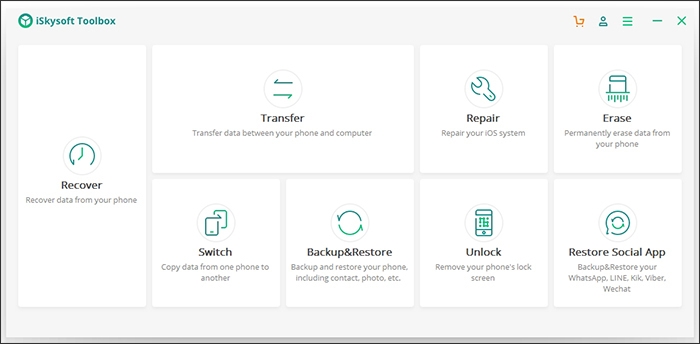
Step 1. Launch iSkySoft Toolbox – Repair (iOS)
Go to the official iSkySoft Toolbox website and download and install it on your computer. Next, launch it and connect your damaged iPhone to the computer using the original USB cable that came with the device. Finally click on repair and go to the next step.
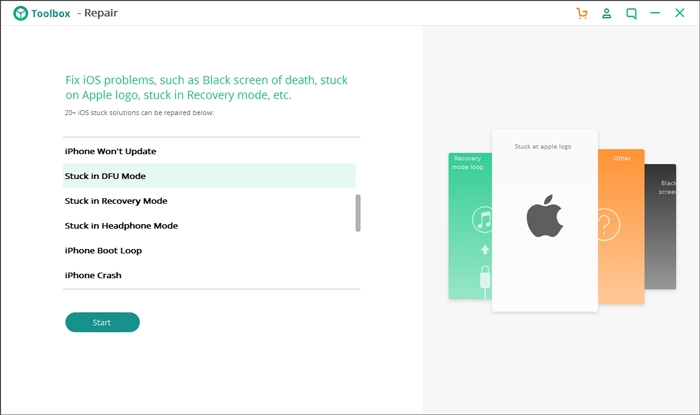
Step 2 – Click on "Start"
In the next screen, you will see a range of issues solved by this tool. You do not need to select which issue is affecting your device. Simply click on "Start" and the tool will do the rest.
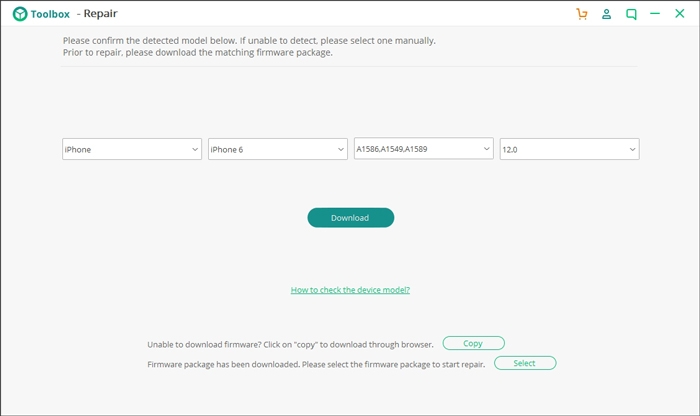
Step 3. Download the firmware
Choose the model of your iPhone and then simply click on "Download" and the firmware will automatically be downloaded.
Step 4 – Fix the Black Screen of Death issue.
With the firmware installed, go to the resultant screen and then click on "Retain Native Data" and then go ahead and click on "Fix Now".
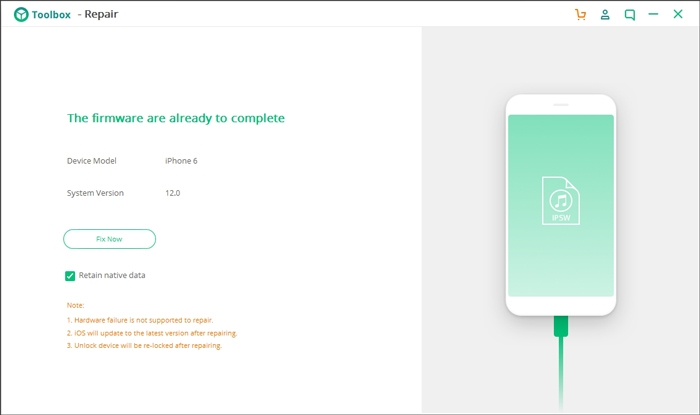
Go grab a cup of coffee and wait for the black screen of death to be removed and you can now access your iPhone just like before.