


A startup represents your unique business idea as well as all of your efforts. Protecting your data and the people working in the facility takes strong instincts and security precautions. While you’re focusing on the important stages of growth, you also need to incorporate various security devices for your modern startup. Discover which items will protect access, information, equipment, and daily operations.
1. Smart Access Control Panels
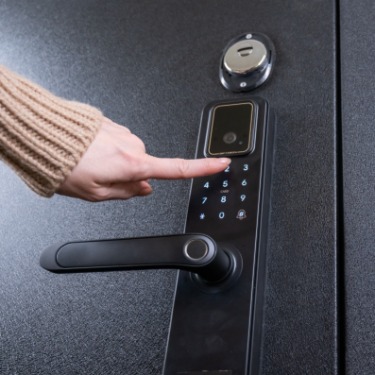
Smart access control panels replace physical keys with digital credentials. Employees might enter through badge cards or mobile passes that administrators manage from a central dashboard. Because permissions live in the software, adjusting access as roles change is simple and quick.
During rapid hiring cycles, this flexibility is very helpful. Contractors may need temporary access to a meeting room during a product sprint. Finance staff may require entry to a records area that other employees don’t use. With a smart panel, each credential matches the person and the space.
2. Biometric Door Locks
Biometric door locks use fingerprints or facial recognition to verify a person’s identity. They work best for spaces where shared codes create serious risks, like a server room or prototype closet.
These devices remove familiar problems. First, staff members don’t need to remember a code during a hectic morning. Plus, they can’t lend a fingerprint to someone else the way they might lend a badge. The result is an extremely secure work environment.
3. Networked Security Cameras
Networked security cameras give teams visibility across entrances and shared areas. Modern systems support encrypted streaming and remote review through secure dashboards. Many cameras also detect motion and send alerts when activity appears after hours.
Good placement matters more than camera count. Entrances and equipment storage areas deserve attention because they provide context during incidents. Open work areas need a light touch. The staff shouldn’t feel like they’re being watched during everyday tasks and conversations.
4. Video Doorbells
To control visitors and increase the building’s security, a video doorbell is beneficial. It combines a camera and two-way audio in a compact device near the main entrance. For offices without full-time reception coverage, the setup solves a workflow gap.
Vendors and delivery drivers might arrive late or during a meeting. With the doorbell in place, employees are able to respond promptly from a phone or desktop. The visitor will receive attention, but the office avoids unnecessary walk-ins.
5. Intrusion Detection Sensors
Intrusion detection sensors monitor access points after the office empties out. Door contacts flag unexpected entry, while motion sensors watch interior zones that hold valuable equipment. Glass break sensors and vibration sensors add another layer around windows, so the system catches trouble before someone moves deeper into the space.
After-hours coverage gives startups a practical safeguard during the most vulnerable part of the day. Laptops, test devices, demo kits, and network hardware may stay in the office overnight. Sensors near ground-level access points help teams respond quickly before a break-in turns into lost equipment or exposed information.
For an effective security system, ensure that the sensors reflect the way the office operates. Ground-level windows, equipment cages, storage closets, and secondary entrances deserve priority because intruders tend to target quiet access points first.
6. Secure Wi-Fi Access Points
Teams use Wi-Fi networks every day. Business-grade units support WPA3 and segmented networks that separate employees from guests. Some models will detect rogue devices that imitate trusted infrastructure.
Segmentation gives startups practical control because a visitor can receive internet access without touching internal systems. Additionally, IoT devices can remain on a limited network that doesn’t reach engineering tools. This structure reduces damage if one device behaves strangely.
7. Hardware Security Keys
To protect critical accounts through physical verification, implement hardware security keys. A user plugs in the key or taps it near a compatible device during login, then the key confirms the request through standards such as FIDO2 and WebAuthn. Startups should prioritize these devices for founders, administrators, and engineers with production access because they carry the greatest account risk.
These devices shine against phishing because they verify the legitimate domain before approving access. A fake login page may still capture a password, but it won’t complete the login without the physical key. For that reason, teams should protect cloud consoles, source code repositories, password managers, and spare keys with clear ownership rules.
8. Encrypted External Drives
For startups that move quickly, encrypted drives form a bridge between portability and controlled data protection. Encrypted external drives protect sensitive files that leave the main network. Hardware encryption models secure data through built-in chips before anyone unlocks the device, so a lost drive doesn’t automatically become a data exposure. They work well for backups, legal files, media transfers, and sensitive handoffs that don’t belong on ordinary removable storage.
Cloud systems handle many collaboration needs, but offline encrypted drives still play an important role in recovery planning. A properly stored backup can stay beyond the reach of ransomware that spreads through connected systems.
9. Document Destroying Devices
All modern startups will encounter physical paper documents. Teams print vendor contracts, hiring forms, shipping labels, investor packets, and product notes during busy operational moments. Since those documents may contain private details, routine disposal needs a device that treats paper as part of the broader security stack.
A cross-cut or micro-cut shredder turns sensitive documents into fragments that casual reconstruction won’t recover. Device choice should match both volume and sensitivity, so a shared office model needs stronger runtime and bin capacity than a small desk unit. Teams need to avoid the common mistakes when buying an office paper shredder by reviewing cut type, duty cycle, sheet capacity, and maintenance first. By taking this precaution, physical data will be secure.
10. Smart Safes
A locked drawer in a desk won’t protect your valuables. Smart safes are ideal for backup drives, spare security keys, signed documents, and unreleased hardware components. Since these items can carry financial, operational, or intellectual property risk, safe storage gives teams a dedicated place for assets that shouldn’t reside in open office areas.
Modern smart safes should include features such as PIN access, biometric unlock, tamper alerts, and audit logs. Each security element turns the safe into a controlled access point that protects your valuables.
Safeguard Your Startup With Security Devices
Security tools work best when each one addresses a specific risk in the workflow. From access control to encrypted external drives, your modern startup needs these security devices to establish layered protection. With thoughtful placement and clear ownership, each device supports a safe office without slowing the team down.
Bio: Casey is a passionate copyeditor highly motivated to provide compelling SEO content. Her expertise spans technical, consumer, and lifestyle industries with an emphasis on readability and detail.